TUN
enable
Enable TUN mode.
stack
TUN mode protocol stack. If no usage issues occur, mixed stack is recommended. Default is gvisor.
Available values: system/gvisor/mixed
Differences between protocol stacks
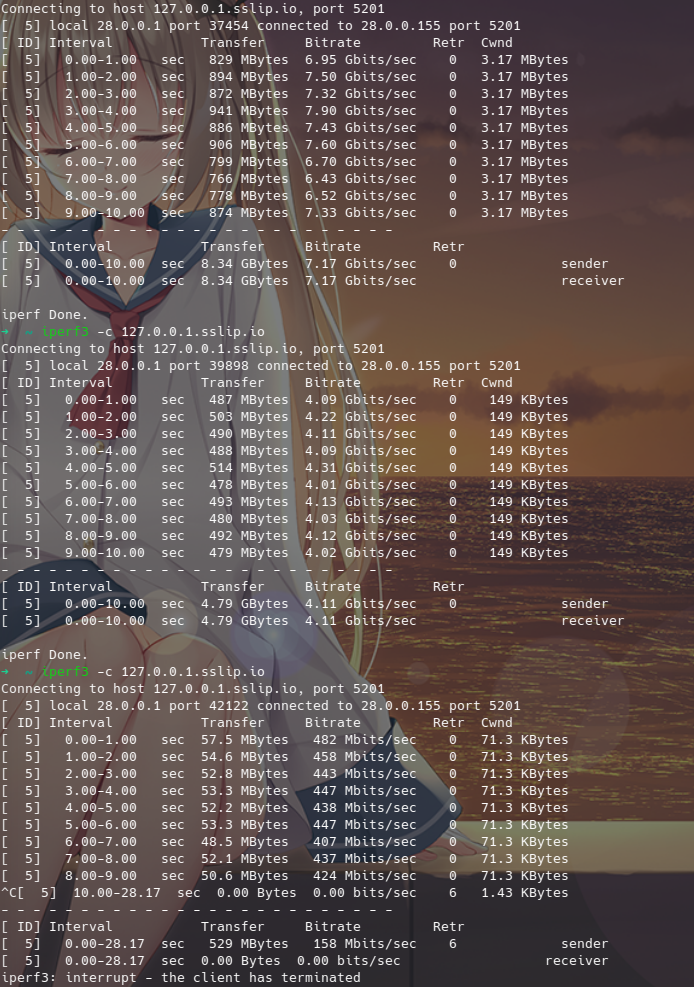
systemuses the system protocol stack, providing a more stable/comprehensive TUN experience with relatively lower resource usage compared to other stacks.gvisorimplements the network protocol stack in user space, offering higher security and isolation while avoiding context switching between the OS kernel and user space, which can yield better network processing performance under specific conditions.mixedis a hybrid stack where TCP uses thesystemstack and UDP uses thegvisorstack, potentially delivering a better overall user experience.- Simple Performance Test
- If the firewall is turned on,
systemandmixedprotocol stacks cannot be used. Allow the core binary through the firewall using the following methods: - Windows: Settings -> Windows Security -> Allow an app through firewall -> Select the core binary.
- MacOS: Generally no configuration is required as the firewall allows signed software by default. If you encounter issues where it cannot be used with the firewall enabled, you can try allowing it: System Settings -> Network -> Firewall -> Options -> Add Mihomo app.
- Linux: Generally no configuration is required as the firewall does not block applications by default. If you encounter issues with the firewall enabled, you can try allowing outbound traffic from the TUN interface (assuming the TUN interface is named Mihomo):
sudo iptables -A OUTPUT -o Mihomo -j ACCEPT
device
Specify the name of the TUN network interface. MacOS devices can only use interface names starting with utun.
auto-route
Automatically set global routes, which can automatically route global traffic into the TUN network interface.
auto-redirect
Linux only. Automatically configures iptables/nftables to redirect TCP connections. Requires auto-route to be enabled.
On Android:
Only forwards local IPv4 connections. To share your VPN connection via hotspot or tethering, please use VPNHotspot.
On Linux:
With auto-route enabled, auto-redirect now works on routers as expected without any manual intervention.
auto-detect-interface
Automatically detect the outbound interface for traffic. It is recommended to manually specify the outbound network interface for devices connected to multiple outbound interfaces simultaneously.
dns-hijack
DNS hijacking. Redirects matched connections into the internal DNS module. If no protocol is specified, it defaults to udp://.
- On
MacOS/Windows, it cannot automatically hijack DNS requests sent to the local network. - On
Android, ifPrivate DNSis enabled, DNS requests cannot be automatically hijacked.
strict-route
Enforces strict routing rules when auto-route is enabled.
On Linux:
- Makes unsupported networks unreachable.
- Routes all connections to the TUN interface.
It prevents address leaks and allows DNS hijacking to work on Android.
On Windows:
- Adds firewall rules to block DNS leaks caused by Windows' normal multi-homed DNS resolution behavior.
It may cause certain applications (such as VirtualBox) to malfunction under specific scenarios.
mtu
Maximum Transmission Unit. It affects the transfer rate under extreme conditions. General users can leave it at default.
gso
Enable Generic Segmentation Offload. Linux only.
gso-max-size
The maximum length of a data chunk.
inet6-address
Specify the IPv6 address of the TUN interface.
Note
- Currently, the program will check other system interfaces for IPv6 upon startup. If none exists, this feature will be disabled. To force enable the v6 address for the TUN interface, please manually set the
SKIP_SYSTEM_IPV6_CHECK=1system environment variable. - It requires
ipv6to be set totruein the top-level configuration simultaneously to take effect.
udp-timeout
UDP NAT expiration time, in seconds. Default is 300 (5 minutes).
iproute2-table-index
The iproute2 routing table index generated by auto-route. Default is 2022.
iproute2-rule-index
The iproute2 rule starting index generated by auto-route. Default is 9000.
endpoint-independent-nat
Enable Endpoint-Independent NAT. Performance might drop slightly, so it is not recommended to enable it when not needed.
route-address-set
Adds destination IP CIDR rules from the specified rule set to the firewall; non-matching traffic will bypass routing.
Linux only, and requires nftables as well as auto-route and auto-redirect to be enabled.
Conflicts with routing-mark in any configuration.
route-exclude-address-set
Adds destination IP CIDR rules from the specified rule set to the firewall; matching traffic will bypass routing.
Linux only, and requires nftables as well as auto-route and auto-redirect to be enabled.
Conflicts with routing-mark in any configuration.
route-address
Routes custom routing subnets instead of the default route when auto-route is enabled. Generally requires no configuration.
route-exclude-address
Excludes custom subnets when auto-route is enabled.
include-interface
Restrict routed interfaces. No restrictions by default. Conflicts with exclude-interface, cannot be configured together.
exclude-interface
Exclude interfaces from routing. Conflicts with include-interface, cannot be configured together.
include-uid
Included users to have their traffic routed by the TUN interface. Users not configured will not have their traffic routed by the TUN interface. No restrictions by default.
UID rules are supported under Linux only, and require auto-route.
include-uid-range
Included user range to have their traffic routed by the TUN interface. Users not configured will not have their traffic routed by the TUN interface.
exclude-uid
Exclude users to prevent their traffic from being routed by the TUN interface.
exclude-uid-range
Exclude user range to prevent their traffic from being routed by the TUN interface.
include-mac-address
Restrict routed LAN devices by source MAC address. Linux only; requires auto-route and auto-redirect.
exclude-mac-address
Exclude LAN device traffic by source MAC address. Linux only; requires auto-route and auto-redirect.
include-android-user
Included Android users to have their traffic routed by the TUN interface. Users not configured will not have their traffic routed by the TUN interface.
Android user and application rules are supported under Android only, and require auto-route.
| Common User | ID |
|---|---|
| Owner | 0 |
| Second Space | 10 |
| App Cloner | 999 |
include-package
Included Android application package names to have their traffic routed by the TUN interface. Application packages not configured will not have their traffic routed by the TUN interface.
exclude-package
Exclude Android application package names to prevent their traffic from being routed by the TUN interface.
Legacy Syntax, Deprecated Soon
inet4-route-address
Routes custom subnets instead of the default route when auto-route is enabled. Generally requires no configuration.
inet6-route-address
Routes custom subnets instead of the default route when auto-route is enabled. Generally requires no configuration.
inet4-route-exclude-address
Excludes custom subnets when auto-route is enabled.
inet6-route-exclude-address
Excludes custom subnets when auto-route is enabled.
Network Loopback Test for TUN Protocol Stacks
From top to bottom are system/gvisor/lwip respectively, for reference only. The platform is Linux; Windows and MacOS may vary.